Software Performance Engineering
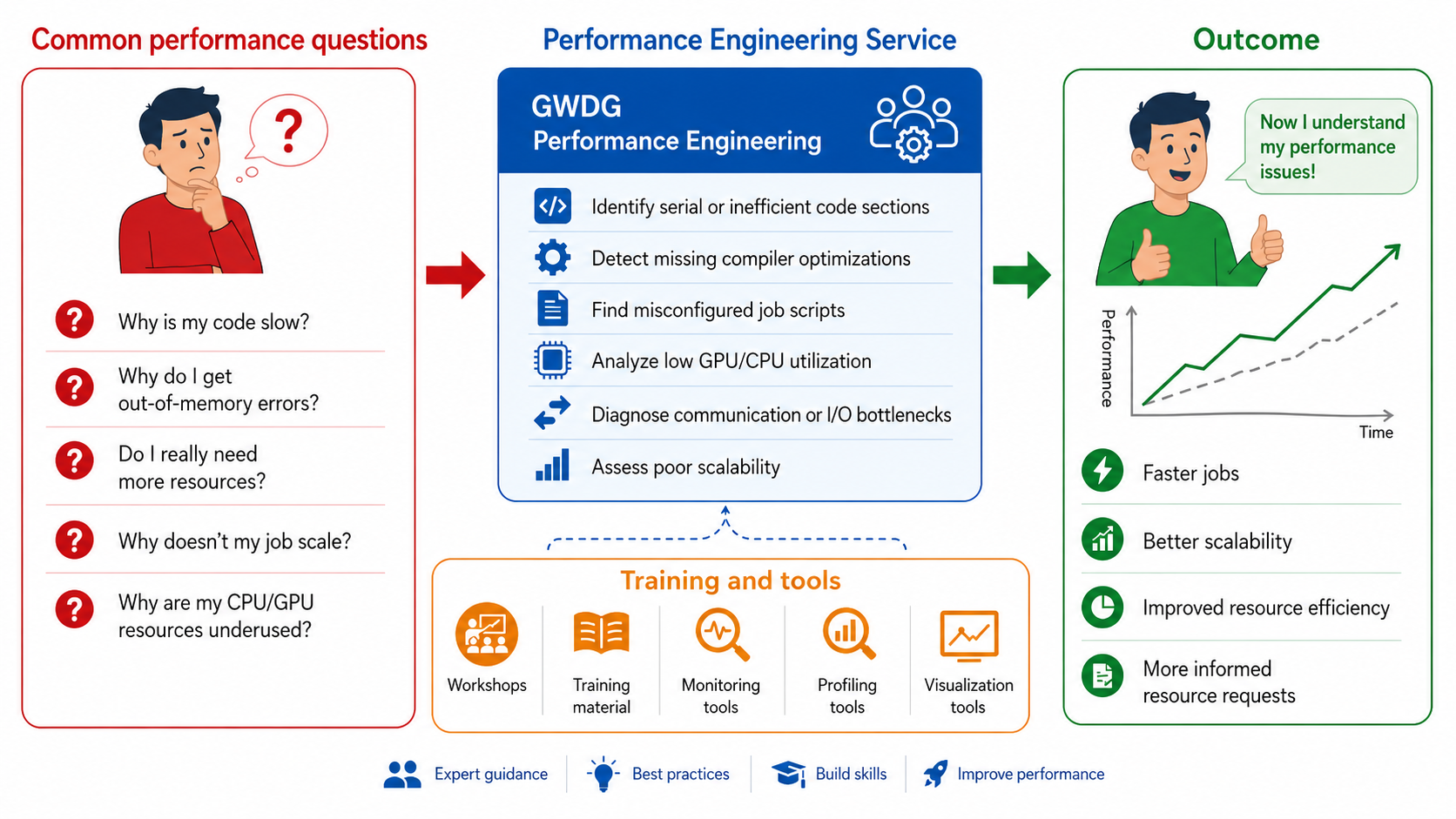
Performance Engineering Service: From questions to better application efficiency
As an HPC user, you should ask yourself whether your job is running efficiently. Answering this question helps you use computing resources more effectively, reduce unnecessary waiting and resource consumption, and improve the experience for other users of the system.
Our Offer
The service aims to help users improve the performance of their applications on HPC systems. The focus is on efficient resource requests and optimizing application code.
Our support covers two main areas, User Support and Training.
User Support and Performance Analysis
We help you to identify and resolve performance bottlenecks in your jobs. This includes how you request for resources such as memory, wall-time, number of CPU/GPUs and also analyzing the behavior of your application (at scale).
If you need assistance to improve your application’s performance, please feel free to contact our support and also mention ‘Performance Engineering’ in the subject.
Training, Documentation, and Knowledge Transfer
We also provide training sessions and informative documentations. Our training sessions cover different levels:
- Introductory: Requesting appropriate resources in job scripts, basic concepts of performance engineering
- Advanced: Using Performance analysis tools, advanced performance analysis workflows, and hands-on sessions
You can find the list of training courses in the section Training courses
Performance Aspects in HPC
In a High-Performance Computing (HPC) environment, the overall efficiency of an application depends on how effectively the software utilizes the underlying hardware. This includes distributing the workload across CPU/GPU cores, memory hierarchy, SIMD vectorization, communication overhead etc. Performance bottlenecks typically manifest across three primary categories: Computation, Communication & Synchronization, and Storage I/O.
Computation
Computational performance measures how efficiently an application executes computational work by maximizing CPU/GPU utilization while minimizing processor idle time, and is typically measured in FLOPS. In HPC environments, computational bottlenecks are typically originated in three main areas:
- Resource Underutilization: Failure to exploit hardware-specific features, poor cache management, failure to offload computationally heavy workloads effectively to the GPU.
- Load Imbalance: Distributing work unevenly across parallel resources. If one CPU core or GPU thread receives a heavier or more complex workload, it becomes a critical bottleneck as all other processors become idle waiting for it to finish. This leads to poor scaling.
- Architectural & Logic Mismatches: Using code logic or data structures that fight the underlying hardware architecture such as non-contiguous memory access patterns, excessive branching, or serial algorithms that prevent parallel scaling.
Communication and Synchronization
Parallel programs often exchange data between processing elements and also align the progress in execution to ensure correctness before continuing computation. This gives rise to two kinds of overheads:
- Communication Overhead: As the scale of a job grows, the time spent moving data between processing elements over shared memory and the interconnect can easily eclipse actual compute time if not managed properly.
- Synchronization Delays: Parallel applications frequently use barriers (MPI/OpenMP), atomic operations, waiting for GPU kernel completion etc. to coordinate the execution of the all involved processing elements. This could lead faster ranks/threads to wait until slower ones reach the synchronisation point.
I/O Performance
I/O performance measures how efficiently an application moves data between compute resources and storage systems. This encompasses all data movement outside pure CPU/GPU computation, including transferring data between memory layers, local storage, or across parallel distributed file systems (like Lustre). It is typically measured in bandwidth, latency etc.
The Critical Bottleneck: CPUs and GPUs can process data many orders of magnitude faster than storage systems can deliver it. If data is not available exactly when a processor needs it, the entire application stalls. Efficient, non-blocking I/O is critical to keep the high-performance hardware fed and active.
Tools
Performance engineering often requires complementary tools aimed towards certain performance characteristics (e.g. function execution times, MPI communication, GPU kernel execution, I/O operations etc.), because no single tool captures all aspects of application behavior. Depending on the workload and analysis goal, we use profiling, tracing, monitoring, and visualization tools to study computation, communication, memory usage, GPU utilization, and I/O behavior.
Examples include, the Score-P ecosystem for detailed profiling and trace analysis, NVTOP for lightweight GPU monitoring, and NVIDIA Nsight Systems for timeline-based analysis of CPU and GPU activity. The choice of tool depends on the application, the required level of detail, and the acceptable measurement overhead.
You can find detailed descriptions and usage examples of each available tool on it’s dedicated page.
Specific tools are:
Training Courses
We offer workshops and training on the subject of Performance Engineering. You can find the list of workshops in the GWDG Academy category for Performance Engineering.
Specific courses are:
- Performance Engineering in ML Workloads Using Score-P and Vampir
- Performance Engineering Tools for AI and HPC Workloads
Contact
- Do you need assistance in improving your application’s performance?
- Write a ticket to our support, mentioning Performance Engineering in the subject
- You are looking for a course in the field?
- Check out our GWDG Academy courses.